








On this page
Collections are easy to publish and hard to browse
Webflow CMS makes it trivial to add another hundred items. Visitors still have to find the right item. Tag clouds alone rarely scale; what scales is a predictable filter model: facets users understand, URLs that make sense when shared, and lists that update without full page reloads when possible.
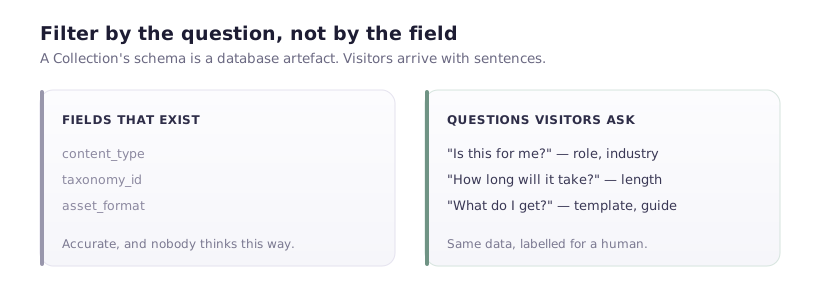
Map filters to real visitor questions
Before touching the Designer, write down the questions visitors ask:
- “Show me templates for SaaS, not agencies.”
- “Only events in this city next month.”
- “Pricing pages that mention enterprise SSO.”
Each question should map to a CMS field or reference you can filter on. If the data model cannot answer the question, no filter UI will fix it—go fix the model first.
Multi-select vs single-select
Single-select simplifies mental models (“pick one industry”). Multi-select helps power users (“compare three product lines”). FlowAppz CMS Filter supports multi-select patterns so you can mirror how people actually shop or research.
URL and state
Decide early whether filtered states should be bookmarkable. If yes, plan query parameters or path segments and keep them stable when you reorder CMS items. If filters are ephemeral, still provide a reset control so users do not feel trapped in an empty result set.
Empty and overloaded results
Design empty states with guidance (“ broaden your filters ”) and overflow when hundreds of items match—pagination or “load more” keeps the DOM sane. Webflow’s collection lists pair well with sensible page sizes.
Performance notes
Filtering large lists in the browser is fine until it is not. Keep images lazy-loaded, avoid gigantic DOM trees, and test on mid-tier phones. The goal is snappy interactions, not a science demo.
Where FlowAppz CMS Filter helps
It is aimed at teams who want collection-driven filters configured in the Designer—mapping collections to filter chips and multi-select behaviors without writing a custom filtering stack per client.
See CMS Filter for install details and feature overview, then prototype one high-traffic resource page before rolling the pattern site-wide.